Tips
First response time: how to measure and improve it

12 Min Read
First response time shows how long customers wait for an initial support reply. Learn how to measure it consistently, spot the causes of delay, and respond faster while keeping answers useful.
Share article:


First response time measures the gap between an incoming request and the first qualifying support reply; define whether you are tracking human replies, AI responses, or both separately.
Choose a consistent clock, reporting cohort, and channel breakdown, then read the mean alongside the median, longer waits, and unanswered tickets.
Set response targets around channel expectations, urgency, service commitments, and actual coverage rather than copying a universal benchmark.
Improve routing, staffing, agent context, and access to trusted answers, then check that faster replies still help customers make progress.
What first response time measures

First response time, often shortened to FRT, is the time between a customer asking for help and the first qualifying reply from support. It is also called first reply time. A request arriving at 09:00 and receiving its first agent reply at 09:20 has a first response time of 20 minutes.
The event that stops the clock needs a written definition. For a human support metric, use the first public human reply, not an internal note or a receipt confirmation. Zendesk’s explanation of ticket reply time excludes automated and bot actions from its standard first reply time calculation. Other tools offer different reporting options, so check your own configuration.
A help desk can record that an agent sent a message without knowing whether it was helpful. Treat usefulness as a quality check alongside the timestamp. A quick acknowledgment from an agent may stop the platform’s timer, but it should not become the team’s substitute for a relevant answer or a clear next step.
Keep related metrics distinct. First response time covers the first reply. Subsequent response time covers later waits in the conversation, while resolution time measures how long an issue takes to resolve. First contact resolution asks whether the issue was solved during the first interaction. Improving one does not automatically improve the others.
If AI handles initial conversations, report its response speed and outcomes separately from the time to a human reply after escalation. Keep the customer’s total wait visible during a handoff, and label any handoff-to-human timer because it excludes earlier bot time.
How to calculate first response time
For a single request, the basic calculation is:
First response time = time of first qualifying reply − time the request arrived
Use one unit, such as minutes, throughout the calculation. For a set of replied requests, calculate the mean as:
Average first response time = total first response time ÷ number of requests with a qualifying reply
The denominator matters. An unanswered request has no completed response duration yet; it should not be entered as zero. Keep those requests visible in a separate waiting view.
Consider this illustrative set of five requests, measured using the same clock. These numbers explain the calculation; they are not a benchmark.
Request | First response time |
|---|---|
A | 2 minutes |
B | 4 minutes |
C | 6 minutes |
D | 8 minutes |
E | 80 minutes |
The total is 100 minutes, so the mean is 20 minutes. The median, or middle value, is 6 minutes. Both are correct: most customers received a quick reply, but one waited much longer.
Read the mean and median together. The mean exposes the effect of long delays; the median describes the middle of the distribution. A 90th-percentile measure, often called P90, adds a view of longer waits. State how your reporting tool calculates percentiles, particularly for small samples, and avoid drawing a trend from a handful of tickets.
For larger queues, show the share of requests meeting the response target as well. Two teams can have the same average while providing very different levels of consistency.
Choose calendar hours or business hours
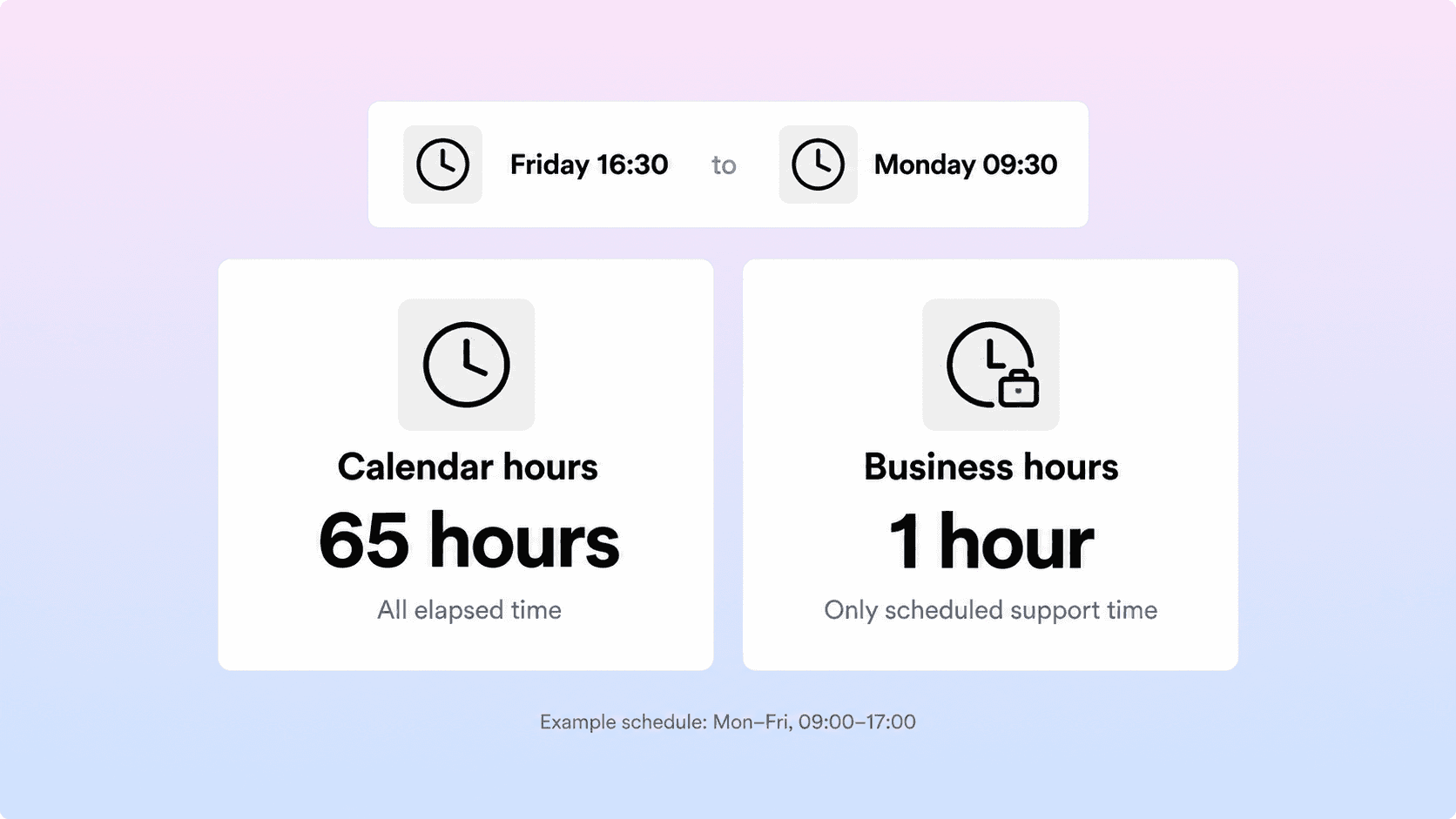
Calendar time includes every hour between the request and reply. Business time counts only the parts of that interval inside the support schedule. These clocks answer different questions: how long the customer waited overall, and how quickly the team responded during its promised coverage.
For example, assume support operates Monday to Friday, 09:00–17:00, with no holidays or clock changes. A message arrives on Friday at 16:30 and gets a reply on Monday at 09:30. That is 65 calendar hours, but only one business hour: 30 minutes on Friday and 30 on Monday.
Neither number should be presented without its clock. “One-hour first response time” would give an incomplete picture of that customer’s weekend wait.
Record the schedule, timezone, holiday calendar, and any channel-specific coverage behind the report. Zendesk documents calendar and business-hour first reply measures, while Intercom’s reporting metric definitions show how office-hour and bot-inbox settings can change what is included. Similar metric names do not guarantee comparable calculations.
For a weekday team, business hours can be the operating measure while calendar hours reveal gaps in the customer experience. If customers repeatedly wait through a weekend for urgent help, relabeling the clock will not address the coverage problem.
Build a report that includes customers still waiting
Choose which requests belong in the report before comparing periods. A report grouped by request creation date follows a different population from one grouped by the date of the first reply. Mixing them can make a backlog cleanup look like a sudden decline in response speed.
For a practical weekly review, follow requests created during the week and state the reporting cutoff. Show completed first response times together with the count and age of requests still awaiting a first reply. Recent cohorts may remain incomplete, so label them and revisit them rather than treating their completed replies as the whole picture.
A useful report includes:
The clock, reporting period, cohort definition, and number of eligible requests.
Mean, median, and a longer-wait measure for requests that received a first reply.
The number still waiting, the age of the oldest unanswered request, and overdue requests.
Response-target attainment by channel and priority, with a defined denominator.
For target attainment, count eligible requests answered on time against requests whose first-response obligation is already determined: those answered, plus unanswered requests whose deadline has passed. Track unanswered requests still within target separately. If your help desk uses another SLA denominator, document it and keep comparisons consistent.
Break the results down by channel, priority, issue category, and coverage period. Add customer segment or language only when it will inform a decision and the sample is large enough. A blended result can improve simply because more low-effort chat requests arrived, while the email queue continued to deteriorate.
Read this view alongside other customer support metrics. The wider set of customer service metrics provides context. This report’s job is to locate the first wait and show who is being left behind.
Set targets for each channel and priority
A good first response time is one that matches the customer’s situation and the service you have promised. An urgent access failure during a live chat session needs a different response plan from a routine email about next month’s invoice.
Start with actual performance for each queue, then compare it with customer expectations and contractual commitments. Establish which requests require immediate triage, which need a specialist, and which can follow the normal queue. Publish support hours and expected response windows where customers contact you.
For each target, write down the channel, priority, clock, coverage window, responsible team, and escalation rule. Decide what happens when the request approaches its deadline. An alert without an owner will not shorten the wait.
Use one primary response promise per defined queue. A percentile or the percentage answered within target can show consistency, but a percentile target is not a guarantee for every request. Keep individual SLA obligations visible where they apply.
Review the target when volume, staffing, or the supported product changes. If the current queue cannot meet a promise reliably, adjust coverage, remove avoidable work, or communicate a realistic window. Pressuring agents to send empty replies only makes the dashboard look better temporarily.
Find what is delaying the first reply
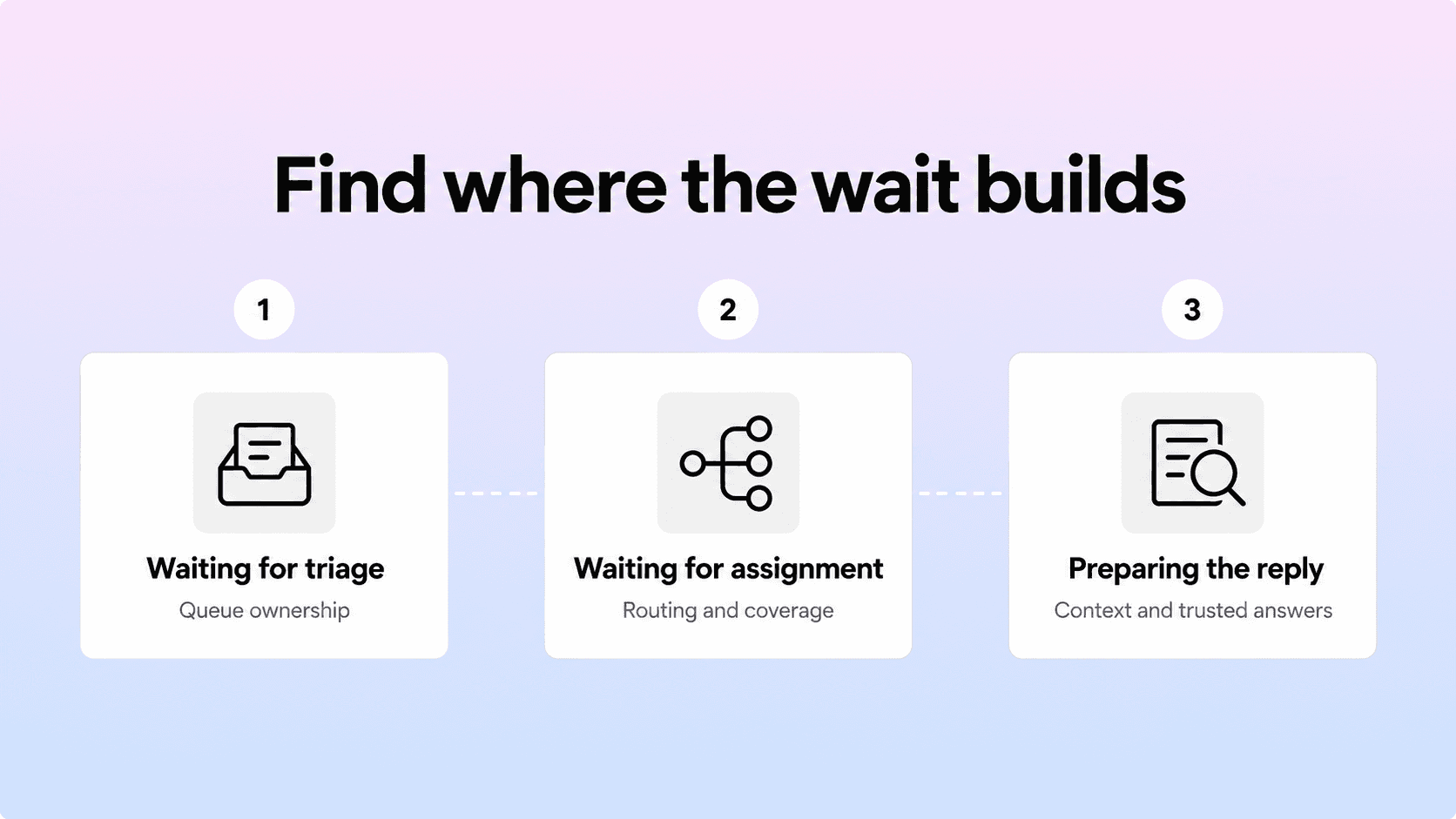
Look at a sample of slow requests and separate the time before assignment from the time after assignment. Then inspect the handoffs, information gaps, and workload behind those intervals. A queue problem and an answer-preparation problem need different fixes.
Waiting for triage or assignment
Requests may sit because the shared inbox has no clear owner, intake labels are ambiguous, or routing sends them through several teams. Check who reviews new arrivals, how often that happens, and what happens when the usual owner is unavailable.
Clear support ticket categories can help route requests to the right team. Keep category separate from priority: a billing question is not automatically urgent, and a technical issue is not automatically a production outage.
Waiting after assignment
An assigned request can still be waiting behind too much work. Intercom’s effectiveness reporting guidance identifies low assignment time combined with high first response time as a possible sign that teammates are too busy to reply.
Compare arrivals with available responders by hour and day. Check shift changes, breaks, specialist availability, releases, and incidents. Moving ownership faster will not create capacity in an overloaded queue.
Preparing a useful answer
Agents may spend the remaining time finding account context, checking permissions, reproducing an issue, or locating a trustworthy explanation. Ask what information was missing and where the agent had to look.
Some investigation is necessary. Improve access to context and approved guidance so agents can send a safe first step without guessing or promising a resolution they cannot deliver.
Improve first response time without weaker replies

Choose the improvement that matches the delay you found. Make one meaningful change, then compare the affected queue over a consistent period with similar demand. Keep an eye on requests that move to another channel or team so a local improvement does not simply move the wait elsewhere.
Give the queue clear ownership and realistic coverage
Assign responsibility for new requests during each coverage period, including handover arrangements. Route common issues directly, reserve specialist attention for work that needs it, and surface tickets approaching their response deadline. During an incident, use a shared update and a clear escalation path so every agent does not repeat the same investigation.
Collect context and make answers easier to find
Ask for the details needed to route or begin troubleshooting, such as the affected workspace, product area, error message, and what the customer expected. Keep intake proportionate; a long form can create effort before the support clock even starts.
Bring permitted account information into the agent’s workflow and maintain a searchable source of approved answers. Give each frequently used answer an owner and review date so agents do not have to reconcile conflicting documents under time pressure.
Use saved replies as a starting point
A good saved reply can supply the correct explanation, prerequisites, and next step. Agents should still adapt it to the request, remove irrelevant steps, and check that it fits the customer’s plan or permissions.
Repeated use also shows where documentation could prevent future contacts. Helpview’s canned response examples explain how recurring replies can become reusable help content. Link to the relevant article section and explain why it applies instead of sending an unexplained URL.
For teams already writing in Notion, a Notion help center can give agents and customers a shared place to find those answers. Review knowledge base analytics to identify search gaps and content that needs attention. Better self-service may change the mix of tickets that reach agents, so evaluate volume and complexity alongside response speed.
Define what a useful first reply contains
The first reply should address the actual request and help the customer understand what happens next. It may provide the answer, a safe troubleshooting step, or a specific question needed to continue. If investigation is required, explain what is being checked, who owns the request, and when the customer should expect an update.
For example, “I found the failed sync. Please reconnect the integration. If it fails, send the error code” gives a next action when that diagnosis is supported by the ticket. Sending it without checking the context would create unnecessary work. The right reply can be short; its value comes from relevance and accuracy.
Review speed alongside reply quality
Sample first replies from both fast and slow requests. Check whether they are accurate, relevant, safe, and clear about the next step. Include requests that escalated, reopened, or received poor customer feedback, rather than reviewing only conversations that ended smoothly.
Use FRT as one of several customer service KPIs, alongside subsequent response time, resolution time, reopen rate, repeat contact, and customer satisfaction. Watch for a pattern where the first reply becomes faster but customers need more messages to get an answer. That can indicate work was pushed into later replies.
Use the weekly review to select one action with an owner: adjust a coverage gap, repair a routing rule, update a heavily used reply, or improve a missing article. Check the next comparable period for both response speed and quality. Avoid ranking agents by an unsegmented average when their queues and issue complexity differ.
Conclusion
First response time becomes useful when the team agrees on the clock, the qualifying reply, and the requests included in the report. Measure typical waits and longer delays, keep unanswered customers visible, and set targets that reflect your channels and coverage. Then fix the causes of waiting while checking that each first reply helps the customer move forward.
Frequently asked questions
What is first response time in customer support?
First response time is the interval between an incoming support request and the first reply that meets the report's definition. For a human support measure, that usually means the first public agent reply. Define bot handling, business hours, and the starting event before comparing results.
How do you calculate average first response time?
What is a good first response time?
Does an automated reply count as a first response?
How can teams improve first response time without losing quality?
Share article:

2 free months of Pro
Turn Notion pages into help center answers.
Keep writing in Notion and publish a real, searchable Notion help center.

Articles
Keep reading