Tips
Documentation workflow: plan, review, and update docs

11 Min Read
A documentation workflow is what keeps customer-facing docs from turning into a pile of half-owned pages, slow approvals, and stale answers. It gives teams a repeatable way to plan, scope, draft, review, publish, and maintain documentation so the help center stays useful as the product changes. For SaaS teams writing in Notion or another lightweight workspace, the goal is not to add bureaucracy. It is to make sure every article has a clear owner, a clear path to publish, and a clear path back into review when the content no longer matches reality.
Share article:


What a documentation workflow actually is
A documentation workflow is the repeatable path a doc follows from first idea to ongoing maintenance. It covers how topics get planned, who owns them, where facts are verified, how drafting happens, who reviews the work, how approval is handled, when the page goes live, and what pulls it back into review later.
That makes a workflow different from the rest of the documentation system around it. Content governance decides ownership, standards, and lifecycle rules at a policy level. Documentation standards define how the page should read and behave once someone opens it. Product documentation is the actual customer-facing guidance users rely on. The workflow is the operating sequence that moves that content through the system without leaving handoffs vague.
This distinction matters because a lot of docs teams already have useful ingredients but still feel disorganized. They may have templates, style guidance, a help center, and a few strong writers. Yet work still gets stuck because nobody scoped the page properly, the wrong reviewer was pulled in too late, or a published article never got revisited after the product changed.
A strong documentation workflow reduces that drag. It gives the team a default rhythm for planning, drafting, review, publish, and maintenance so the quality of the docs does not depend on one especially organized person remembering every step.
It also helps to think in lifecycle terms. A page is not done because it was approved once. If the UI changes, the terminology shifts, support starts seeing the same confusion again, or search behavior changes, the workflow should bring that page back into work. That is what makes documentation operations feel intentional instead of reactive.
The 6 stages of a healthy documentation workflow
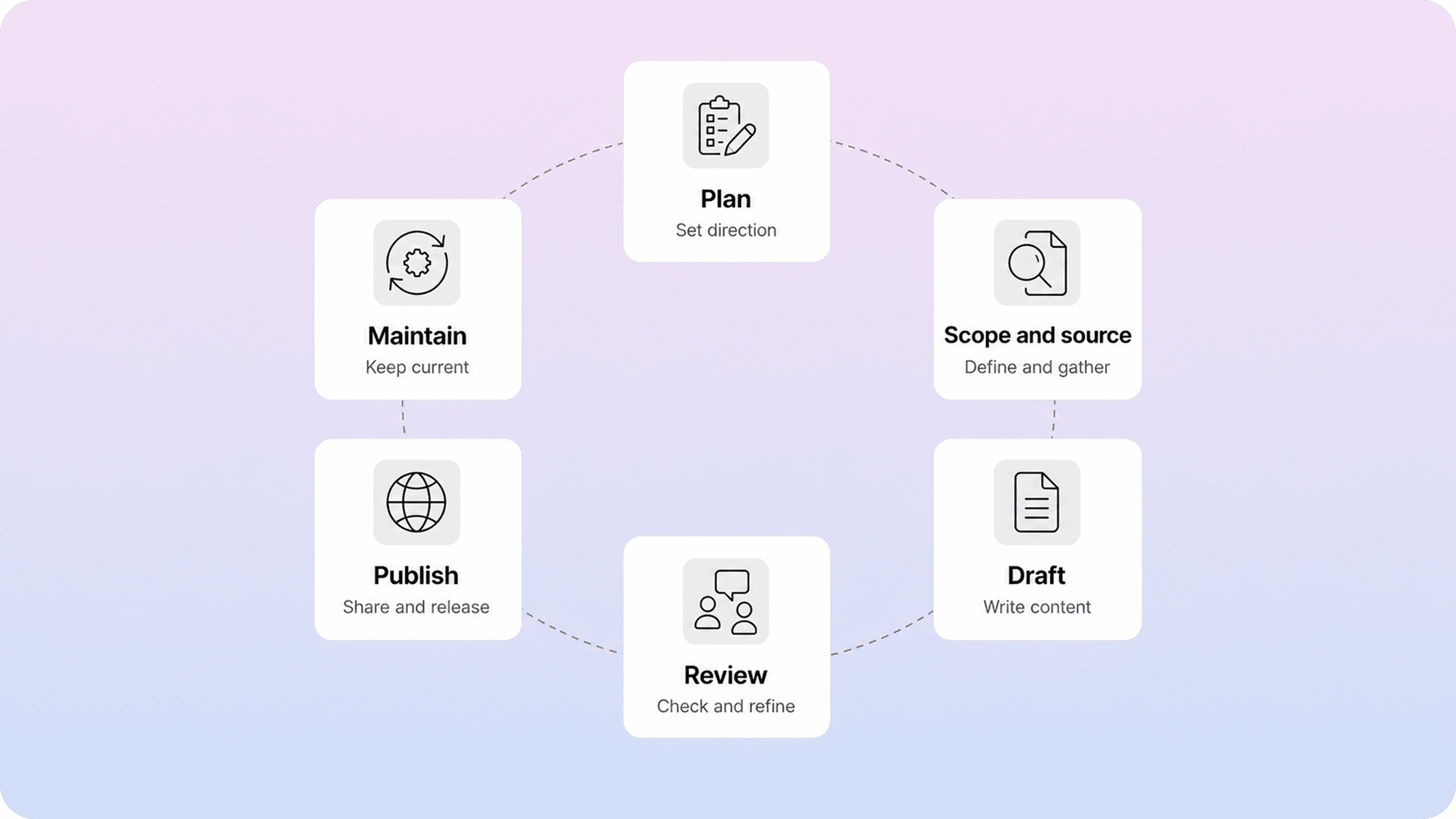
A healthy documentation process does not need a complicated diagram, but it does need a clear sequence. Most teams can run on six stages without turning the workflow into bureaucracy.
Stage | Core question | Working output |
|---|---|---|
Plan | Why does this page need to exist now? | brief, owner, audience, content type |
Scope and source | What exactly should this page cover, and what facts are authoritative? | outline, source of truth, exclusions |
Draft | What is the clearest version of the article? | first draft in the agreed template |
Review | Is it accurate, clear, complete, and aligned to standards? | comments, revisions, approval decision |
Publish | Is it ready to go live in the right place with the right metadata and links? | published page, slug, metadata, related links |
Maintain | What should trigger the next update, review, merge, or archive decision? | review date, trigger rules, lifecycle status |
The main value of this model is not the labels themselves. It is that each stage answers a different operational question. Planning tells you why the article belongs in the system. Scoping keeps the page from turning into a loose grab bag. Drafting turns that scope into something readable. Review checks quality without guessing who owns which decision. Publishing makes the article discoverable. Maintenance keeps it trustworthy after launch.
Teams usually struggle when they skip one of those questions rather than one of the names. They start drafting before they define the reader. They review without knowing the source of truth. They publish without setting a next-review date. Or they call something a workflow when it is really just “write a doc and hope someone spots problems later.”
That is why documentation lifecycle thinking matters. The article is only healthy when each stage has a visible output and the next stage is obvious. If a team cannot tell whether a page is waiting for facts, waiting for review, live but stale, or ready to archive, the workflow is still too fuzzy.
How teams plan docs before writing starts
Planning is where a documentation workflow quietly wins or loses. If the team starts with a vague request like “we need docs for this feature,” the draft will usually inherit that vagueness. The writing becomes slower, the review gets noisier, and the published page tries to answer too many jobs at once.
A better planning step answers a small set of questions up front. What user problem is this page solving? Who is it for? What action should the reader be able to take by the end? What kind of page is it: getting started, how-to, troubleshooting, policy, or overview? Which product facts, UI labels, or policy details count as the source of truth? What should stay out of scope because it belongs in a separate article?
That does not require a heavy briefing ritual. Most teams can handle it with a compact doc brief or request form tied to one owner. The important part is that the workflow creates a real handoff from request to scoped work. Once the owner, audience, source of truth, and article shape are clear, the draft moves faster and the review becomes much more specific.
Planning is also the best place to catch duplication risk. Before writing starts, teams should check whether the topic already exists, whether another page covers part of it, or whether the request is really an update to an existing article rather than a net-new page. That is one of the simplest ways to avoid cannibalization inside a help center. If the team is still normalizing article shapes, a clear knowledge base template helps keep that planning step from turning into guesswork.
For customer-facing docs, good planning should also account for findability. Titles, page scope, and likely search wording matter before the first sentence is written. A page that starts with clear user language is much easier to review, publish, and maintain than one that begins as an internal feature memo and gets translated later.
How review and approval should work without slowing everything down
Review is where many documentation workflows become either too loose or too heavy. In one version, anyone can publish and mistakes slip through. In the other, every article waits on too many reviewers and simple updates stall for days. A good documentation review process sits between those extremes.
The cleanest model is usually role-based. One person owns the page. One or more reviewers check the parts they are responsible for, such as product accuracy, support fit, legal or policy risk, or editorial clarity. An approver only needs to exist when the topic carries enough risk to justify that extra gate. That keeps responsibility visible without pretending every page needs the same approval path. Atlassian’s roles and responsibilities play is a useful reminder that teams move more cleanly when responsibility is explicit before work starts slipping between people.
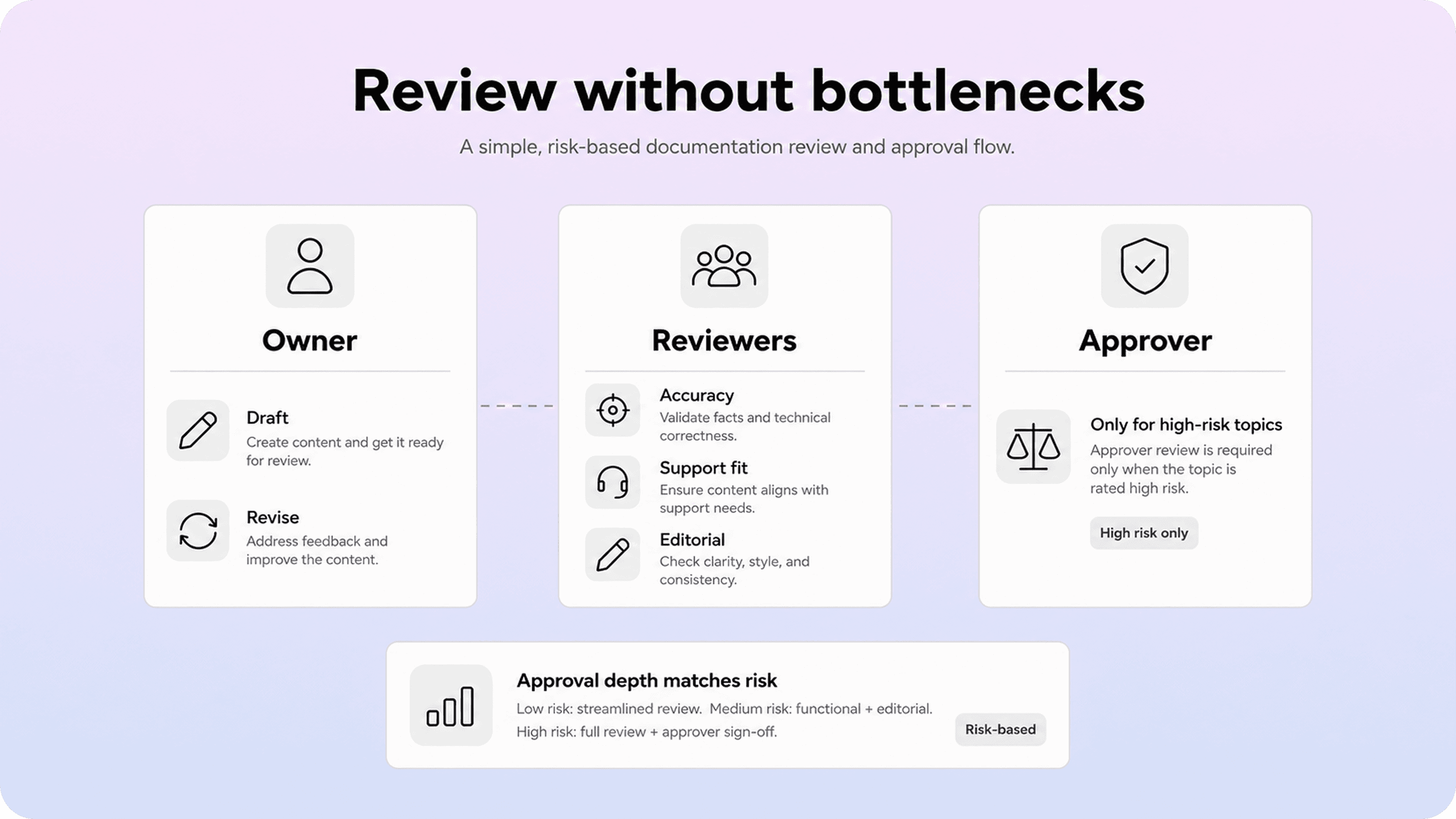
This is where a documentation approval workflow should stay proportional. A simple how-to article about a UI task does not need the same signoff path as billing policy, security settings, or compliance-sensitive content. If all pages follow the heaviest approval route, the workflow teaches teams to avoid updating docs until the pain becomes obvious.
The review pass itself should stay focused on a few questions. Is the page accurate? Does it match the source of truth and live UI wording? Is the article scoped tightly enough to be useful? Are the next steps, links, and metadata clear? Does the page meet the team’s documentation standards without turning the review into line-by-line preference debate?
The smoother workflows also separate review types. Subject-matter review checks whether the content is right. Editorial review checks whether the page is readable and consistent. Final approval checks whether the page can go live. When those jobs blur together, feedback becomes repetitive and nobody knows which comments are blocking.
That is also why many strong docs teams borrow from docs-as-code workflows. The point is not that every help article needs a software-engineering ceremony. It is that issue tracking, version history, and clearly staged review make documentation easier to integrate into normal product work.
The goal is not to remove rigor. It is to make the rigor predictable. Teams move faster when the workflow tells them exactly whose feedback is needed, what kind of feedback it is, and what changes the page from “in review” to “approved.”
How to keep docs updated after publish
A documentation workflow is incomplete if it ends at publish. Most stale documentation does not come from bad intentions. It comes from the absence of a maintenance loop. The page went live, helped people for a while, and then quietly drifted out of sync with the product, support reality, or search behavior.
That is why documentation maintenance needs both scheduled reviews and trigger-based reviews. Scheduled reviews create a default cadence for important content, such as monthly checks for high-traffic pages, quarterly checks for evergreen explainers, and faster review cycles for risk-heavy topics. Trigger-based reviews catch the moments where waiting for the next calendar date is too slow.
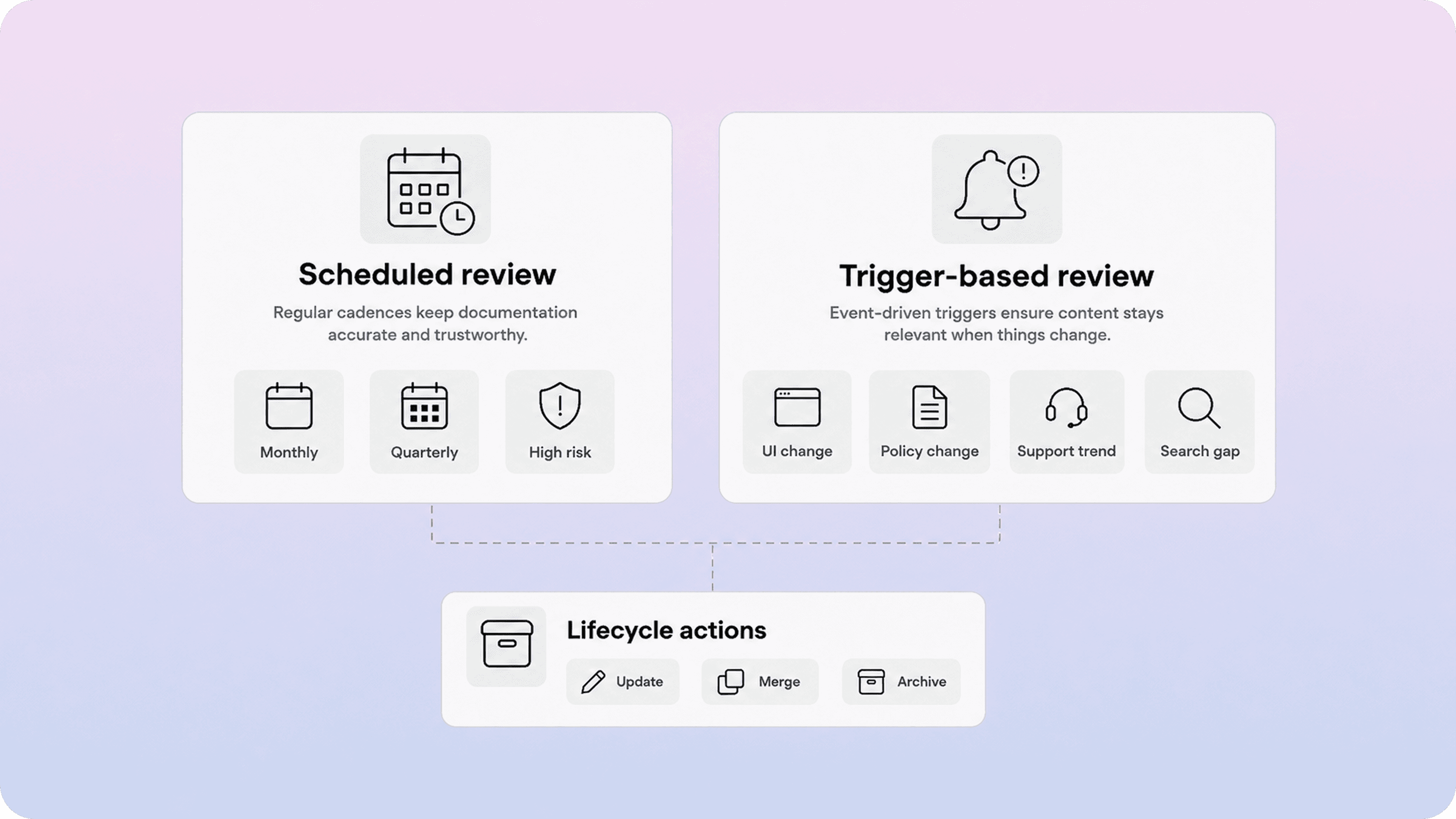
Useful triggers are usually easy to name. A UI label changed. A workflow changed. Pricing, permissions, or policy rules moved. Support starts seeing the same confusion again. Search terms shift. A page gets traffic but still produces tickets. Another article now overlaps enough that the two pages should be merged, redirected, or tightened.
This is also where documentation lifecycle decisions need to be explicit. Not every page should stay live forever. Sometimes the right move is a straightforward update. Sometimes it is a merge. Sometimes it is a redirect or archive. The workflow works better when those outcomes are built in, instead of treating every stale page as a small editing task.
The strongest maintenance loops stay connected to real signals. Support themes, zero-result searches, search queries, stale screenshots, duplicate answers, and product releases all tell you something about which pages need attention next. When teams review those signals in a lightweight recurring rhythm, documentation maintenance stops feeling like a cleanup sprint and starts feeling like normal operations. The same habit supports stronger help center best practices and cleaner help center SEO, because current, well-scoped pages are easier for both readers and search systems to trust.
Build the workflow into your docs system
A documentation workflow becomes much easier to follow when it is visible in the tools the team already uses. If the real process lives only in a slide deck or a policy page, people fall back to memory. That is when ownership gets fuzzy, review dates disappear, and docs updates start happening only when someone complains loudly enough.
For Notion-first teams, the workflow can stay simple. Use a request or brief template, assign one owner, capture content type and source of truth, track a status field that mirrors the real workflow, and store a next-review date before the page goes live. That is enough to make the work legible without building a heavy operations layer.
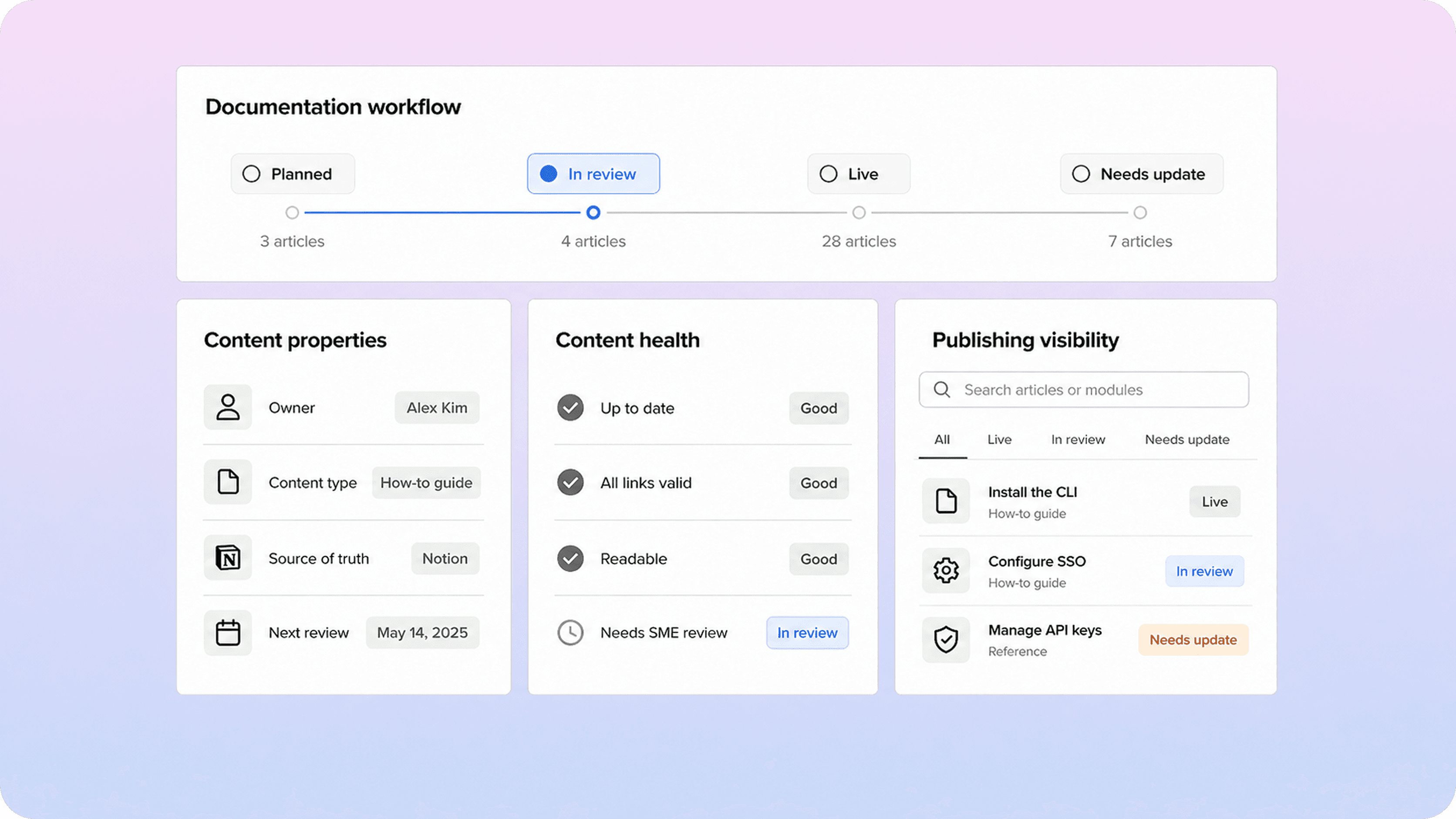
A useful setup often includes a few standard properties across all docs work:
owner
content type
source of truth
workflow status
required reviewers
publish date
next review date
lifecycle action if stale
Once those properties exist, the workflow stops being theoretical. The team can see what is planned, what is blocked in review, what is live without a next-review date, and which pages are candidates for update, merge, or archive.
The publishing layer matters too. When documentation is turned into a structured customer-facing help center, weak titles, missing metadata, duplicate topics, and stale article paths become easier to spot. That visibility is useful because it turns documentation workflow from an internal discipline into a practical self-service quality system. The same principle shows up in both the Google developer documentation style guide and the Microsoft Writing Style Guide: writing guidance works better when clarity and consistency are built into the system people actually use.
The best outcome is not a perfect process map. It is a team that can answer basic operational questions quickly: what are we writing, who owns it, what state is it in, what has to happen before it goes live, and what will pull it back into review later. Once those answers are built into the system, documentation operations get much calmer.
A Notion help center works especially well when Notion is already where your team plans, writes, and reviews documentation, since the customer-facing version can stay connected to that workflow.
Conclusion
A good documentation workflow is not a layer of admin on top of writing. It is the practical system that helps teams plan the right page, review it with the right people, publish it cleanly, and update it before customers stop trusting it. When planning, approval, and maintenance are all visible parts of the same loop, docs become easier to run as a product surface instead of a backlog of one-off pages.
Frequently asked questions
What is a documentation workflow?
A documentation workflow is the repeatable process a team uses to plan, scope, draft, review, approve, publish, and maintain documentation. It defines the path a page follows through work, not just the writing step itself.
How is a documentation workflow different from content governance?
Who should approve documentation before it goes live?
How often should documentation be reviewed and updated?
What is a good documentation workflow for teams using Notion?
Share article:

2 free months of Pro
Turn Notion pages into help center answers.
Keep writing in Notion and publish a real, searchable Notion help center.

Articles
Keep reading