
Tips
Content governance for documentation teams

14 min read
A docs team can get surprisingly far without formal governance. Then the cracks show up all at once: two versions of the same answer, a setup guide that nobody owns, screenshots from an old UI, and a reviewer chain so fuzzy that stale pages stay live for months. Content governance is the system that stops that drift. For docs teams, it means deciding who owns what, which standards every page must meet, and how content gets reviewed, updated, or archived before customers lose trust.
Share article:

What content governance means for docs teams
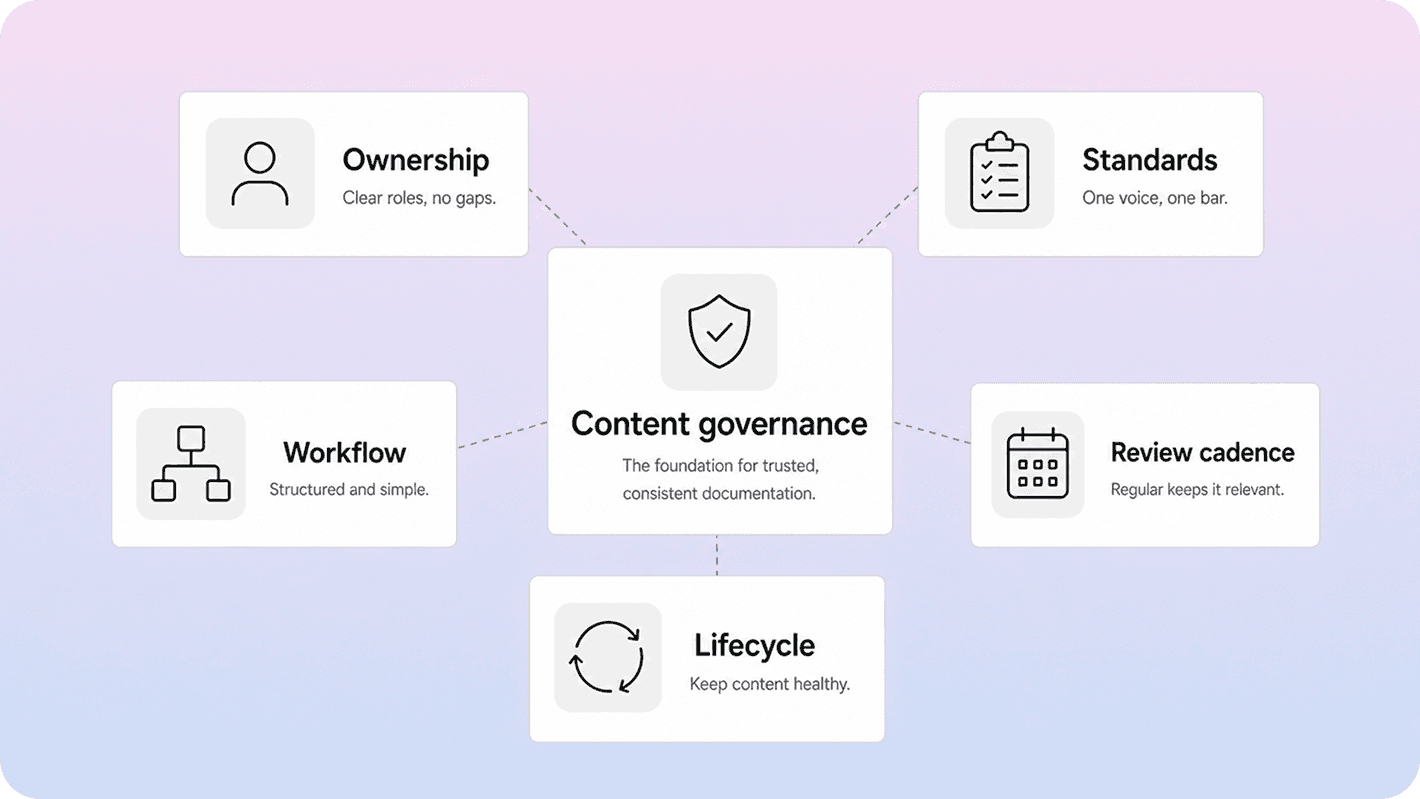
A simple content governance definition is the set of rules and guidelines that determines how content gets created, reviewed, published, and maintained. That broad definition is useful, and Bynder’s overview of content governance captures the basics well. But for docs teams, the practical meaning is narrower and more useful.
Content governance is the system that keeps documentation trustworthy after the first draft is written. It covers ownership, editorial standards, workflow states, review timing, and maintenance rules. In other words, it answers six operational questions:
who owns this page
what standard must it meet
who reviews it
when does it get reviewed again
what happens when the product changes
when should it be archived, merged, or rewritten
That is different from content strategy. Strategy decides what content you should publish and why. Governance decides how that content stays consistent once it exists.
It is also different from an article template. A template helps one article stay structured. If you are working on article-level consistency, our guide to a knowledge base template is the more specific read. Governance sits one level above that. It is the system that makes sure every template, article, and update is used the same way across the team.
For Helpview’s audience, this matters because many teams already write in Notion. The problem is rarely “we have no docs.” The problem is that the docs are scattered, uneven, or nobody is fully accountable for keeping the published version current. Governance is what turns a pile of useful pages into a maintainable help center.
Why docs teams need governance before the content base gets messy
A docs team usually feels the need for governance before it names the problem. Support starts linking two different articles for the same issue. Product changes a settings label, but the docs still use the old name. A page ranks in search or gets heavy traffic inside the help center, yet nobody can say who should update it.
Those are governance problems, not writing problems.
Without governance, four failure modes show up fast:
Ownership drift:* everyone can edit, so nobody is clearly accountable
Standards drift:* articles start sounding and looking different from one another
Workflow drift:* reviews happen inconsistently or only when someone complains
Lifecycle drift:* old pages stay live long after they stop being accurate
The cost is bigger than a messy docs folder. Trust drops. Self-service gets weaker. Support has to explain exceptions manually. Customers stop trusting the first article they see and start opening tickets instead. That is the same pattern behind many help-center quality issues in our guides to help center best practices and how to reduce support tickets with a help center: the answer may exist, but the system around it does not keep it findable, current, or consistent.
Governance helps earlier than many teams expect. You do not need hundreds of articles to justify it. If your team already has recurring support topics, multiple contributors, and a customer-facing help center, you already have enough complexity for a lightweight content governance strategy.
The goal is not bureaucracy. The goal is reducing avoidable inconsistency before it becomes normal.
A simple content governance framework for docs teams
A useful content governance framework does not need a giant policy deck. It needs a few decisions made clearly and applied consistently.
Area | What to decide | Minimum good-enough rule |
|---|---|---|
Ownership | who is directly responsible for each page or section | every article has one named DRI |
Standards | what “publishable” means | shared rules for voice, structure, naming, links, screenshots, and metadata |
Workflow | how drafts move to live | documented statuses, required reviewers, and approval rules |
Review cadence | when content is checked again | time-based reviews plus trigger-based reviews after product or policy changes |
Lifecycle | what happens to weak or outdated content | update, merge, redirect, archive, or delete deliberately |
Measurement | how governance is working | track stale pages, repeat tickets, zero-result searches, and high-traffic pages with weak outcomes |
This is the part many teams miss: a content governance process is not only about publishing controls. It is also about maintenance controls. If governance stops at “someone approved this once,” it is not really governance. It is just pre-publication review.
A stronger model treats docs like a living system. Kontent.ai’s breakdown of content governance is helpful here because it frames governance as a mix of processes, standards, lifecycle control, roles, and reviews rather than just editorial sign-off.
For docs teams, that usually leads to a simple model:
one owner per page
one minimum quality bar
one review path
one re-review rule
one clear archive path when content no longer deserves to stay live
That is enough to build a real content governance framework without making the team slower.
Define ownership before you write another article
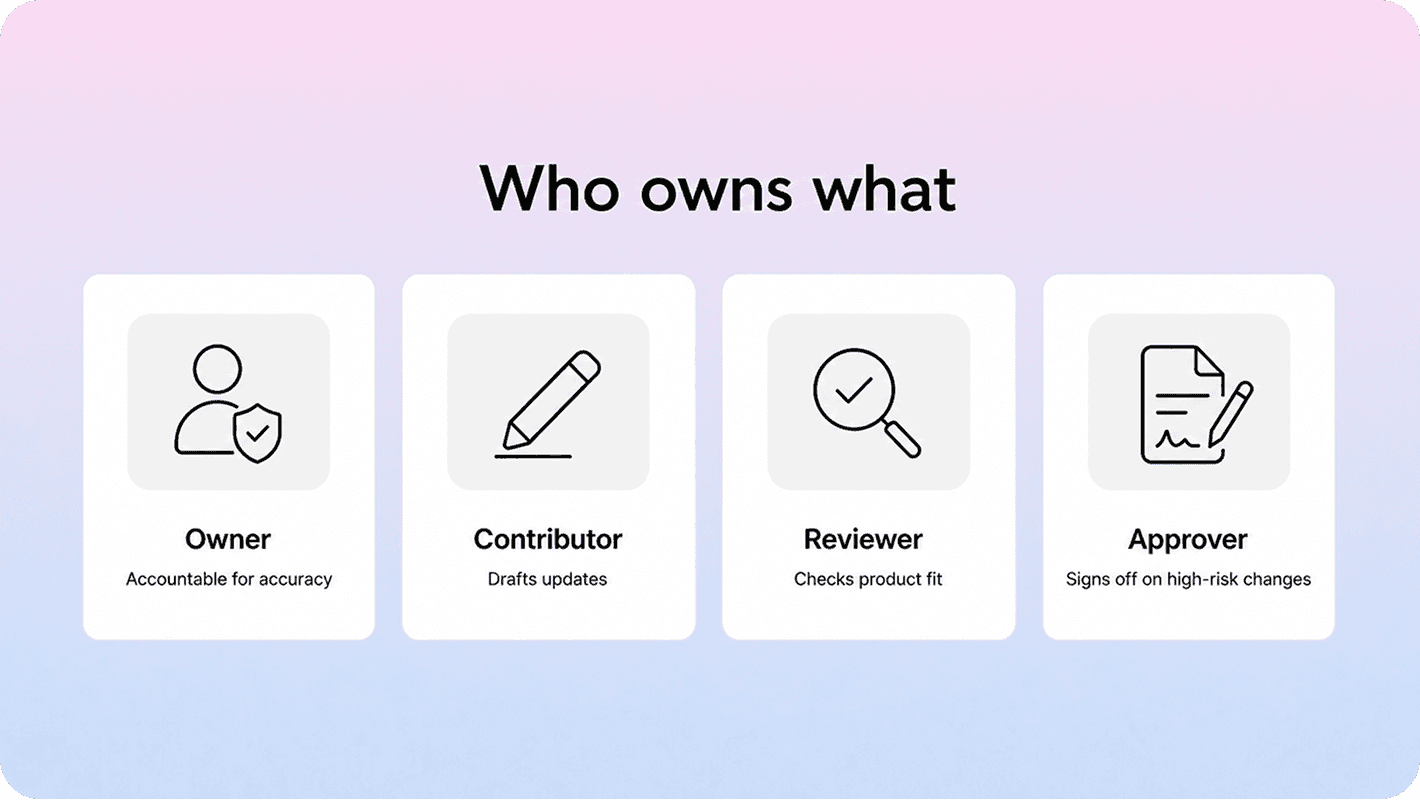
If your governance model has one job, it should be making ownership visible.
A docs team does not need ten roles for every article. It does need clarity. The cleanest model usually includes four responsibilities:
DRI or owner:* responsible for accuracy and upkeep
Contributor:* drafts or updates the content
Reviewer:* checks product accuracy, policy accuracy, or support fit
Approver:* gives final sign-off when the topic is high risk or customer-critical
Sometimes one person covers more than one role. That is fine. The important part is that each role is still explicit.
If ownership stays fuzzy, governance breaks in predictable ways. Reviewers assume the writer will catch product issues. Writers assume product or support will request updates when something changes. Old pages stay live because nobody feels they have the authority to retire them. Atlassian’s guidance on roles and responsibilities gets at the same core idea: reduce confusion by defining who is responsible for what before work starts slipping between people.
A practical ownership model for docs teams often looks like this:
a docs lead owns the standards and governance rules
product managers or feature owners act as subject-matter reviewers
support leads flag repeat issues and stale articles
each page or content cluster has one named maintainer
That last part matters most. Governance fails when ownership exists only at the team level. “The docs team owns this” is usually too vague. A page needs a real human owner, even if that owner works within a shared system.
If your docs already power a customer-facing knowledge base, the ownership layer becomes even more important. It is one thing to keep internal notes slightly messy. It is another thing to let public help content drift while customers keep using it as a source of truth. That is why governance connects naturally to broader knowledge base maturity. If you are still aligning the basics of what a knowledge base should do, our primer on what a knowledge base is is a useful companion.
Set standards that make docs easier to write and review
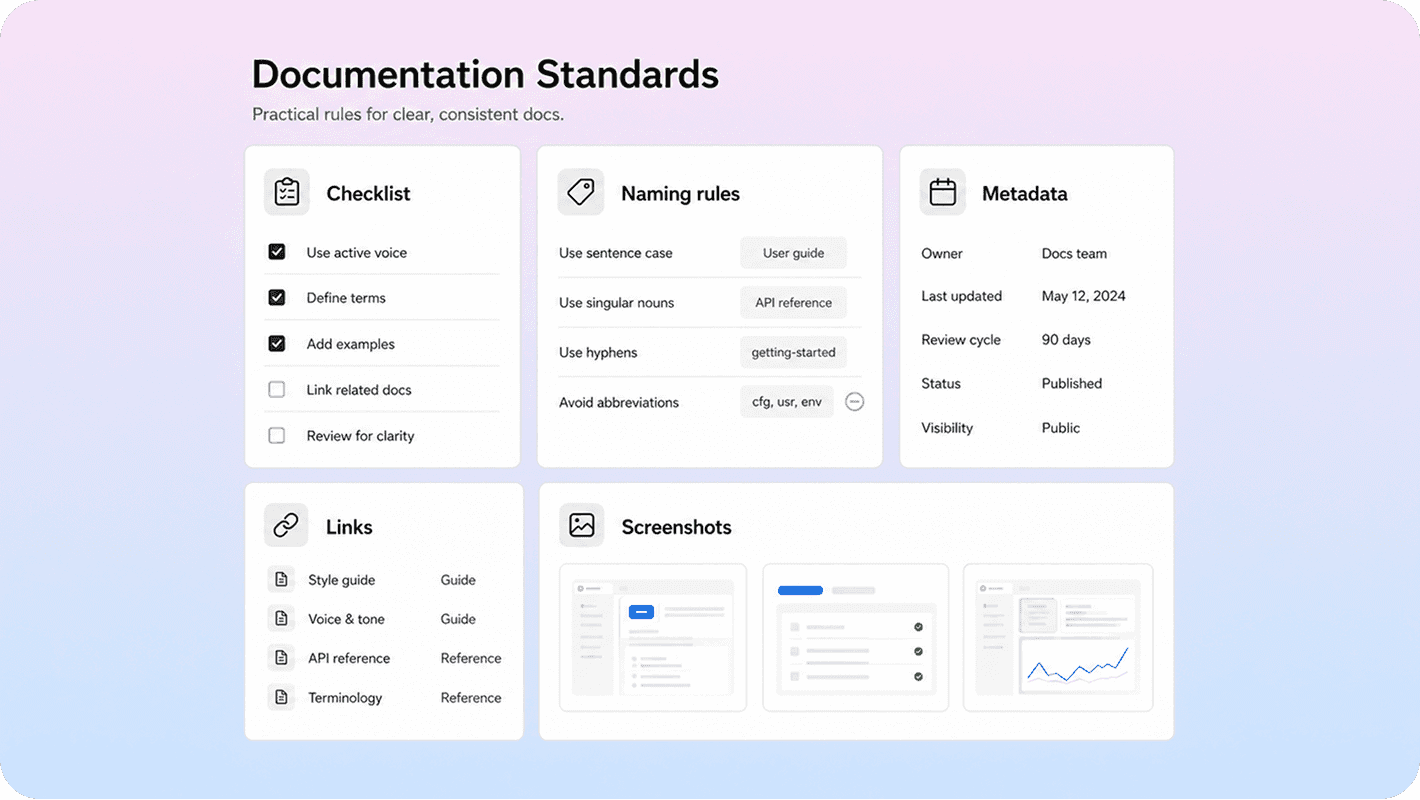
Standards are where content governance becomes usable.
Without standards, reviews turn subjective fast. One reviewer wants shorter intros. Another wants more screenshots. Another changes terminology every time. Governance only helps if the team can point to a shared standard instead of re-litigating the basics on every page.
For most docs teams, the minimum standards set should cover:
Voice and tone:* what “clear” sounds like in your docs
Article structure:* required sections for how-to, troubleshooting, policy, and overview pages
Naming:* product terms, feature names, capitalization, and preferred phrasing
Linking rules:* when to link to related articles, when to use external sources, and when not to
Screenshot rules:* when screenshots are necessary and how often they must be refreshed
Metadata rules:* titles, descriptions, slugs, and search-oriented naming
Source-of-truth rules:* where product facts, policy details, and UI labels should be verified before publishing
The strongest standards are usually small, not exhaustive. You want the rules people will actually use.
If you need a model for shared style guidance, the Microsoft Writing Style Guide is a strong example of keeping terminology and writing expectations centralized. Google’s developer documentation style guide is just as useful for a second reason: it explicitly recommends using project-specific guidance first, then broader editorial references, and prioritizing clarity and consistency when rules conflict. That is exactly how a practical content governance strategy should work.
The same applies to readability. GOV.UK’s guidance on writing for the web is still one of the clearest reminders that even specialist content should stay direct, specific, and easy to scan.
A helpful rule of thumb is this: standards should remove repeat debate.
If your team keeps arguing about the same terminology, screenshot usage, heading structure, or linking style, that decision belongs in governance. Once it is written down, reviews get faster and the docs feel more consistent across the whole help center.
Build a review workflow that keeps content current
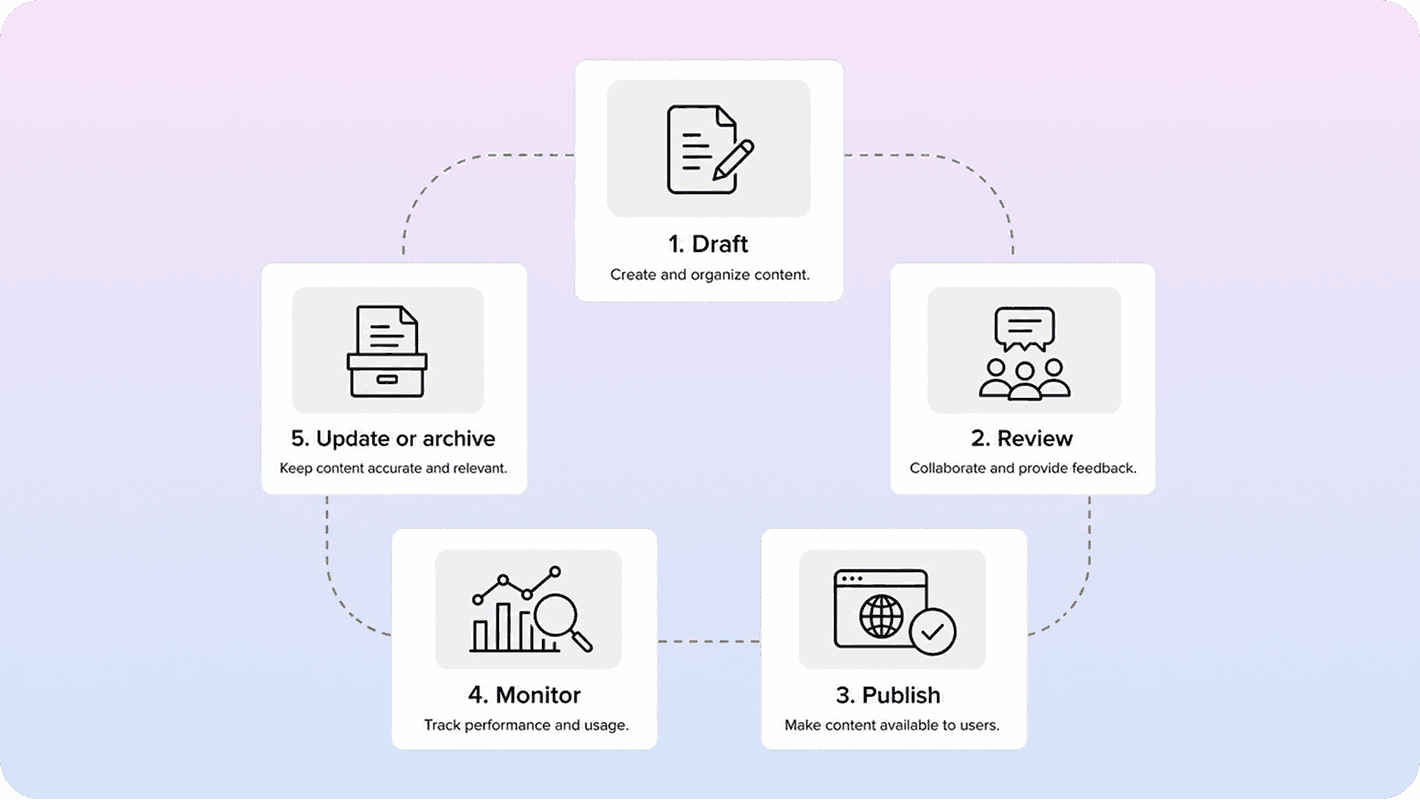
A content governance process is only real if it survives after publication.
That is why review workflows matter more than most teams think. Documentation quality rarely collapses because the first draft was terrible. It collapses because nothing reliably pulls the page back into review after a UI rename, pricing update, policy change, integration change, or product rewrite.
A strong review workflow usually combines two review types:
Scheduled reviews:* every important page is rechecked on a fixed cadence
Triggered reviews:* specific events force a page back into review immediately
Triggered reviews are often the missing piece. Good triggers include:
a feature or UI label changed
pricing, permission, or policy rules changed
support reports a repeat misunderstanding
search behavior changes sharply
the article starts getting traffic but still creates tickets
The workflow itself can stay simple. For example:
Draft or update the article
Run the page against the standards checklist
Send it to the right reviewer based on topic risk
Publish with a next-review date
Reopen on trigger or on scheduled review
Update, merge, redirect, or archive based on what changed
The mistake to avoid is treating every page the same. A password reset guide, billing policy page, and feature overview do not all need the same approval depth. Good governance sets review rules by risk and impact, not by habit.
This also connects to search and support operations. If a high-traffic page keeps creating confusion, the problem may be governance rather than traffic quality. That is one reason our guide to SEO for help centers pairs well with governance work: visibility without maintenance just makes outdated content easier to find.
A useful review workflow should answer five things clearly:
what must be reviewed before publish
who reviews which content types
what events trigger an immediate re-review
how review dates are tracked
what happens to content that no longer meets the standard
Once those rules exist, governance becomes operational instead of aspirational.
For teams using Notion as the source of truth, a Notion help center helps keep the publishing side simple while the ownership and review process stays in the workspace your team already uses.
Start with a lightweight governance template and tighten it over time
The fastest way to kill content governance is to make version one too heavy.
Most docs teams do better with a lean content governance template they can actually use every week. That first version can fit on one page.
A practical starter template should include:
Owner:* who is directly responsible for this page or section
Content type:* how-to, troubleshooting, policy, overview, FAQ
Source of truth:* where product or policy facts are verified
Required reviewers:* product, support, legal, security, or none
Publish standard:* the checklist the page must meet before going live
Review cadence:* monthly, quarterly, biannual, or event-based
Trigger events:* what forces an immediate review
Lifecycle rule:* update, merge, redirect, archive, or delete
Success signals:* useful metrics tied to findability, accuracy, and support outcomes
That is enough to create a real content governance strategy without overengineering it.
A simple rollout usually works best in this order:
Pick your 20 highest-impact pages
Assign one owner to each
Define the minimum publish standard
Add next-review dates
Create two or three trigger rules tied to product and support changes
Clean up duplicates and retire obvious dead weight
Only after that should you expand the governance system further.
This matters because docs governance should make writing and review easier, not slower. The best systems feel boring in the best way. People know the rules, the right pages get reviewed on time, and the help center becomes easier to trust because it behaves like one maintained product instead of a pile of pages.
Conclusion
Content governance is what turns documentation from a useful side project into a reliable system. For docs teams, the practical version is not complicated: make ownership visible, define the standards that stop repeat debate, and build a review workflow that catches drift before customers do. If those three pieces are working, your docs become easier to write, easier to review, and much easier to trust at scale.
Frequently asked questions
What is content governance in documentation?
Content governance in documentation is the system of ownership, standards, workflows, and review rules that controls how docs are created, published, updated, and retired. It goes beyond writing quality alone and includes who is accountable, what quality bar must be met, and how content stays accurate over time.
Who should own content governance on a docs team?
How often should docs be reviewed?
What should a content governance framework include?
Do small docs teams need a formal content governance process?
Share article:

2 free months of Pro
Turn Notion pages into help center answers.
Keep writing in Notion and publish a real, searchable Notion help center.

Articles
Keep reading