Tips
Support operations: how lean support teams work

13 Min Read
Support operations connects the people, processes, tools, and knowledge behind reliable customer support. This guide explains how a lean team can organize ownership, route requests, measure progress, and improve the system without adding unnecessary administration.
Share article:


Support operations designs and maintains the system around customer conversations: ownership, workflows, tools, routing, reporting, and knowledge.
A small team can share operations responsibilities, provided each recurring decision has a named owner, a backup, and time allocated to it.
Build a clear customer support process before automating it, including exception paths, escalation handoffs, and customer updates.
Review queue health, resolution quality, and repeated demand together, then turn the findings into specific process, product, or documentation improvements.
Support operations connects the people, processes, tools, and knowledge behind reliable customer support. This guide explains how a lean team can organize ownership, route requests, measure progress, and improve the system without adding unnecessary administration.
What support operations means
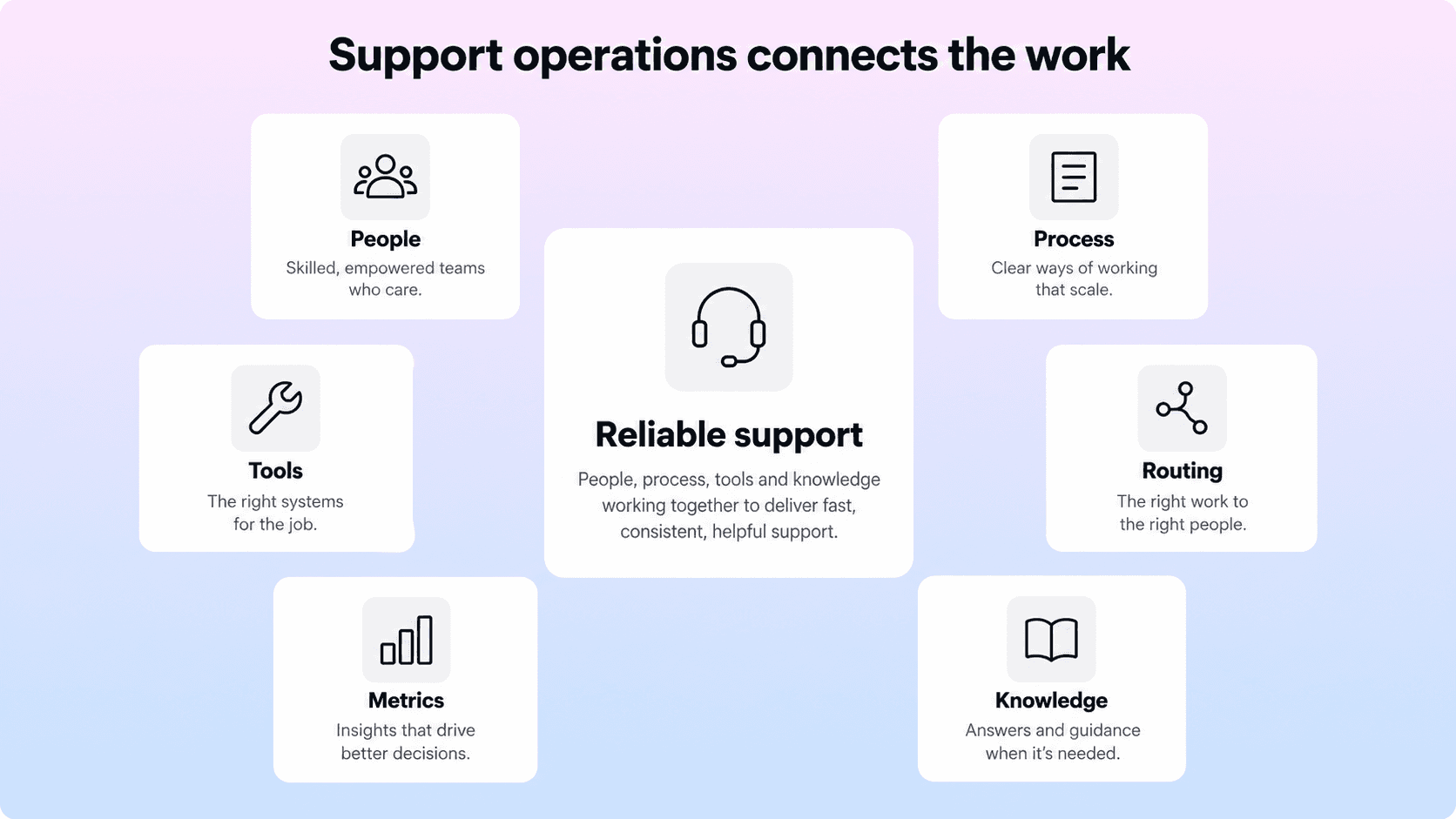
Support operations is the work of designing, maintaining, and improving the system that enables a support team to help customers consistently. It covers how requests enter the queue, who takes responsibility, what information people need, how work moves between teams, and how the organization learns from the results.
An agent might answer a question about a failed integration. Customer support operations addresses the conditions around that answer: whether the right specialist received the request, whether the relevant troubleshooting guide was available, whether an engineering handoff contained enough evidence, and whether the customer knew when to expect an update.
The distinction is between handling an individual request and improving how requests are handled repeatedly. In a lean team, the same person may do both. The responsibilities still need separate attention because urgent conversations can consume every available hour.
Support operations also overlaps with support management. A manager typically owns team performance, coaching, and service commitments; operations turns those commitments into workable routines, systems, and information. Neither label requires a separate department. What matters is that someone owns the work and has authority to change it.
What makes the system scalable
A scalable support system can absorb changing demand without relying on one person's memory or constant intervention. A new teammate can find the current process. A specialist can accept an escalation without asking the customer to start again. A recurring question can become reusable guidance rather than another custom reply.
That does not mean every request follows an identical path. Billing questions, product incidents, and account access problems need different decisions. Operations creates a dependable default and makes the exceptions visible, so people know when judgment or additional help is required.
Give every operating responsibility an owner
For a small team, begin with responsibilities rather than job titles. A shared inbox does not automatically create shared accountability. If everyone can assume someone else is watching unassigned requests, those requests can wait unnoticed.
Assign a primary owner and backup for queue review, coverage planning, workflow changes, tool administration, knowledge maintenance, and reporting. One person can hold several responsibilities. Record when each responsibility is performed and which decisions the owner can make without further approval.
For example, a rotating queue lead can review unassigned work and approaching response commitments during an agreed coverage period. Another teammate can maintain saved replies and help articles. The support lead can review recurring escalations with engineering. These are possible arrangements, not prescribed staffing ratios.
Responsibility | A practical ownership rule |
|---|---|
Queue and coverage | Name the person watching new work and the backup for absence or overflow. |
Process and routing | Assign an owner who can explain, test, and revise assignment rules. |
Tools and access | Keep an administrator and backup with documented access responsibilities. |
Support knowledge | Identify who reviews flagged answers and coordinates product changes. |
Reporting and improvement | Give each recurring review an owner who records decisions and follows through. |
Protect time for this work. If documentation and reporting happen only after the queue is empty, they may never happen. Allocate a realistic improvement slot based on coverage and demand, then adjust it when the team repeatedly cannot use it.
Define the service promise alongside staffing. Decide which channels the team can cover, during which hours, and what happens outside that coverage. Offering another channel creates another queue and another expectation; opening it should be an operating decision rather than a cosmetic website change.
Map the customer support process from intake to follow-up
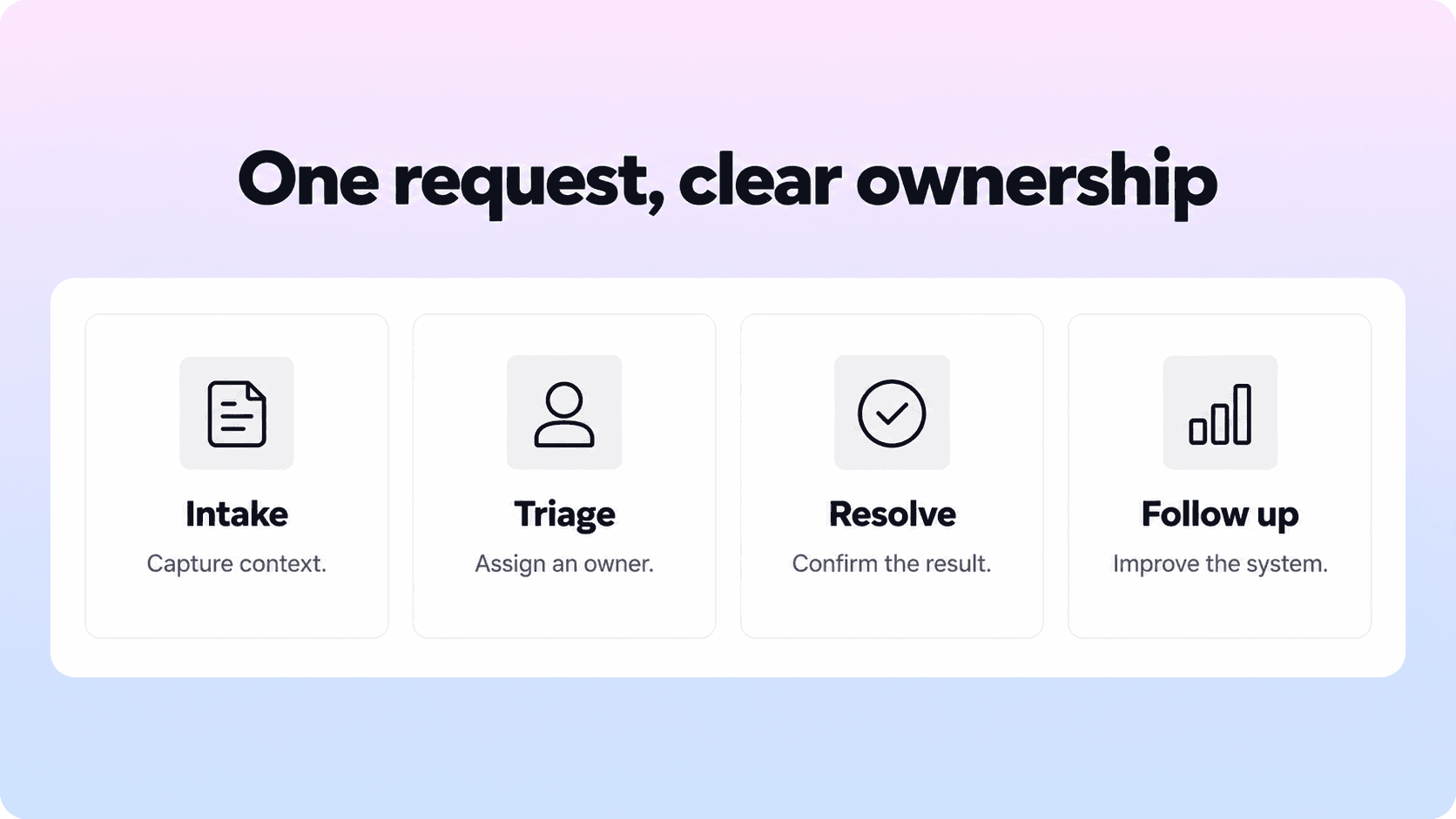
A useful customer service workflow describes the next action, its owner, and the condition for moving forward. Start by mapping real requests rather than writing an idealized process from memory. Include a straightforward question, a request needing another team, and an issue that reopens after an apparent resolution.
Capture enough context at intake
Ask for information that changes the next action: the affected account, the customer's goal, what happened, and the relevant error or reference. Avoid demanding a full diagnosis before someone can contact support. Agents can add details after the first investigation.
Keep sensitive data out of ordinary troubleshooting instructions. Explain which identifiers or redacted screenshots are useful and provide the appropriate channel for information requiring restricted access. The intake form should help the team understand the issue without encouraging customers to share passwords or secret keys.
Triage by subject, impact, and urgency
Category describes what the request concerns. Priority describes how quickly it needs attention based on impact and urgency. Ownership describes who is responsible for the next step. Keep these decisions distinct so an integration question does not automatically receive the same priority as a widespread integration outage.
Use a small classification system that agents can apply consistently. Helpview's guide to support ticket categories provides more detail on that taxonomy. Within the operating workflow, a category should earn its place by improving routing, reporting, or the next action.
Define a fallback for uncertain requests. A ticket without a confident category still needs an owner; it should not disappear into an unmonitored miscellaneous queue. Let agents revise classification as evidence improves.
Keep responsibility clear through escalation
Escalation needs an acceptance point. Sending an internal message does not establish that another team has taken responsibility. Agree on what information a handoff requires, where the receiving team accepts it, and who continues communicating with the customer.
A technical handoff might include impact, reproduction steps, expected and actual behavior, relevant environment details, evidence already checked, and the next customer update time. Keep a named support owner until the handoff is accepted, and explicitly assign communication ownership afterward.
Statuses should explain what the work is waiting for. Waiting for the customer and waiting for engineering are different states, even when both requests remain unresolved. Each waiting state needs a follow-up rule so it cannot become indefinite storage.
Close with a usable outcome
Define what resolution means for the request. A how-to question may be resolved when the customer can complete the task; a defect may require a verified fix or an accepted workaround. Administrative closure after no response should remain distinguishable from confirmed success in analysis.
Give the customer the result, any remaining limitation, and a clear next step. If the issue returns, reopen or reconnect the history according to the team's process rather than making the customer repeat the investigation.
Configure tools around the agreed workflow
A help desk can record ownership, statuses, history, and service commitments. A knowledge base can provide reusable answers. An issue tracker can hold engineering work. These tools become useful together when the team defines which system owns each record and how information moves between them.
Start with the handoffs that currently create the most confusion. A link from a ticket to an engineering issue may be enough to establish traceability; copying the full conversation into several systems can create conflicting versions and unnecessary access to customer data.
Maintain a short record of important configuration: required fields, routing rules, notifications, permissions, and integration owners. Give each rule a purpose. When nobody can explain why an old rule exists, investigate its dependencies before changing it.
Automate stable decisions first
Good early candidates include assigning a clear category to a known group, reminding an owner about a waiting request, or acknowledging receipt with accurate coverage expectations. Automation needs trustworthy inputs and a fallback when those inputs are missing.
Zendesk's trigger documentation explains its condition-and-action model and how ticket triggers can affect other triggers. The wider operating lesson is to test rules together, because individually sensible rules can produce an unintended combined result.
Test a routine request, an exception, a reopened ticket, and a case matching multiple conditions. Check assignment history and customer notifications. Document how to disable the change if it creates repeated reassignment or excessive messages.
If AI helps classify requests or draft replies, give it an explicit scope, approved information, and a route to human review. Check incorrect assignments and unsupported answers before expanding its responsibilities. A faster output is useful only when it helps the team reach a dependable result.
Make support knowledge part of daily work

Support knowledge includes customer-facing instructions and internal guidance: troubleshooting steps, policy decisions, escalation criteria, and explanations of known limitations. Keep the audience clear. An internal investigation note may contain context that should never appear in a public article.
Give agents a practical habit: look for an existing answer, check that it applies, and flag or fix gaps while the context is fresh. The Consortium for Service Innovation's KCS Solve Loop embeds knowledge work in problem solving. Its reuse is review practice treats the moment an answer is used as an opportunity to improve it.
For a lean team, this can be a lightweight routine. When an agent discovers that a guide omits a permissions requirement, they add the missing step or leave a specific correction for its owner. The next customer and the next agent benefit from the same investigation.
Connect tickets, saved replies, and articles
A saved reply should point to the current explanation where appropriate and leave room for customer-specific context. If it contains a separate copy of a long procedure, it can drift when the product changes. Review the related article and reply together when a recurring issue changes.
Teams writing customer guidance in Notion can use a Notion help center to make that content accessible through a customer-facing help experience. Assign ownership of accuracy and findability alongside publishing. A page is useful only if customers can recognize the right answer and complete the task.
Prioritize knowledge work from evidence: repeated explanations, failed searches, articles customers report as confusing, and issues that reopen. Helpview's knowledge base analytics guide explains how search and contact behavior can support that review.
Do not assume that fewer tickets prove the content worked. Demand may have changed, customers may have stopped trying, or the contact path may have become harder to find. Compare the affected issue over time and review whether customers can still get help when the article is insufficient.
Run a small review that leads to decisions

Support operations needs a feedback loop, not an ever-growing dashboard. Begin with the decisions the team needs to make: whether coverage is sufficient, where requests wait, which handoffs fail, and which repeated issues deserve a permanent fix.
Review incoming demand alongside unresolved work and its age. A queue with fewer tickets can still contain a small group of customers waiting far too long. Break down trends by meaningful dimensions such as channel, category, or severity when the sample supports interpretation.
Pair speed with resolution quality. Useful first response, time to resolution, reopens, customer feedback, and unresolved escalations answer different questions. Keep counting rules and coverage hours explicit so changes in reporting do not look like changes in service.
For a wider selection of measures, use Helpview's guide to customer service metrics. This operating review should stay focused on what the team can decide and change.
Establish a workable review rhythm
A short daily queue check can identify unassigned work, missed updates, and requests needing escalation. A weekly review can examine a few representative conversations and choose an improvement. A less frequent configuration review can revisit routing, access, coverage, and article maintenance. Adjust the cadence to demand rather than adopting a meeting schedule for its own sake.
Record a problem, a proposed change, an owner, and a review date. For example, if requests repeatedly bounce between billing and support, agree on clearer acceptance criteria, update the routing guidance, and check the next relevant cases. Measure whether transfers and customer repetition fall without delaying necessary escalation.
Review process quality as well as agent actions. A missing policy, unclear product error, or unavailable specialist cannot be solved by asking an agent to type faster. Send recurring product issues to a named product owner with evidence and a follow-up commitment.
Build the minimum operating system first
Begin by examining a manageable sample of recent conversations across normal, escalated, reopened, and still-waiting requests. Identify where work loses context, ownership, or momentum. Choose one recurring problem that the team can address within its current authority.
Write the smallest useful process for that problem. A page describing intake, ownership, the exception path, customer updates, and resolution criteria is often more actionable than a long operations manual. Test it with the teammates who handle the work and revise confusing instructions before encoding them into automation.
Then establish a baseline. If the change targets routing, record transfer patterns and assignment delay. If it targets knowledge, review repeated questions and customer progress for the affected issue. Track the relevant outcome alongside workload and quality so improvement in one area does not conceal a new problem elsewhere.
Add complexity when the existing approach cannot handle an observed need. A specialist queue may help when it has consistent demand and reliable coverage. More required fields may help when the information changes a decision. A dedicated operations role may make sense when recurring system work exceeds what distributed owners can maintain. None of these steps requires an arbitrary team-size threshold.
Keep the operating documents easy to find and revise. When a process changes, update its instructions, saved replies, related knowledge, and tool settings together. Tell the affected teammates what changed and why, then check real requests to see whether the intended behavior follows.
Conclusion
Support operations gives a lean team a dependable way to handle demand and improve how support works. Start with clear ownership, a usable request workflow, and knowledge people can trust. Configure tools around those decisions, test automation against exceptions, and review customer outcomes alongside queue health. The system becomes more scalable when each improvement reduces a recurring source of confusion or rework.
Frequently asked questions
What is support operations?
Support operations is the work of designing and improving the systems behind customer support. It connects ownership, staffing coverage, workflows, tools, routing, reporting, and knowledge so the team can handle requests consistently and learn from recurring problems.
How is customer support operations different from customer support?
Does a small team need a dedicated support operations role?
What should a customer support process include?
Which support operations metrics should a lean team track?
Share article:

2 free months of Pro
Turn Notion pages into help center answers.
Keep writing in Notion and publish a real, searchable Notion help center.

Articles
Keep reading